
Does PetSmart Accept Apple Pay?
Yes, PetSmart accepts Apple Pay in stores, but not on petsmart.com. PetSmart’s own Afterpay instructions tell shoppers to tap to pay in store with Apple Pay or Google Pay.
Online, PetSmart lists credit cards, PayPal and gift cards as its payment options. Here’s how each method works and when to use it.
| Where | Apple Pay? |
|---|---|
| PetSmart stores | Yes, tap at the card reader |
| Petsmart.com | No, use a card, PayPal or gift card |
| Grooming, PetsHotel and training | Yes, when you pay in store |
| Delivery apps like DoorDash | Depends on the app |
Using Apple Pay in Store
PetSmart’s checkout readers accept contactless payments. Hold your unlocked iPhone or Apple Watch near the reader and confirm with Face ID, Touch ID or your passcode.


Scan your Treats Rewards account before you pay. Points are earned no matter which payment method you use, as our Treats Rewards guide explains.
Setting Up Apple Pay
Open the Wallet app on your iPhone and tap the plus sign to add a credit or debit card. Your bank may ask you to verify the card with a code.
Choose a default card in Wallet settings so the right one comes up at the register. You only need to set this up once.
On Apple Watch, add cards through the Watch app on your iPhone. Then double-click the side button on the watch and hold it near the reader.
Google Pay and Other Wallets
PetSmart’s Afterpay page names Google Pay alongside Apple Pay for paying in store. Android users can tap to pay the same way.
Other phone wallets may work if your card and the reader support them. If one doesn’t, a card tap or swipe is the easy fallback.
Why Apple Pay Doesn’t Work Online
PetSmart’s online payment page lists American Express, Discover, Mastercard, Visa, PayPal and gift cards. Apple Pay isn’t on that list.
For quick online checkout, save a card to your PetSmart account or use PayPal. Afterpay is also available online.
PetSmart says credit cards aren’t charged until online orders ship. Some debit cards show an immediate authorization, which isn’t the final charge.
Every Way to Pay at PetSmart
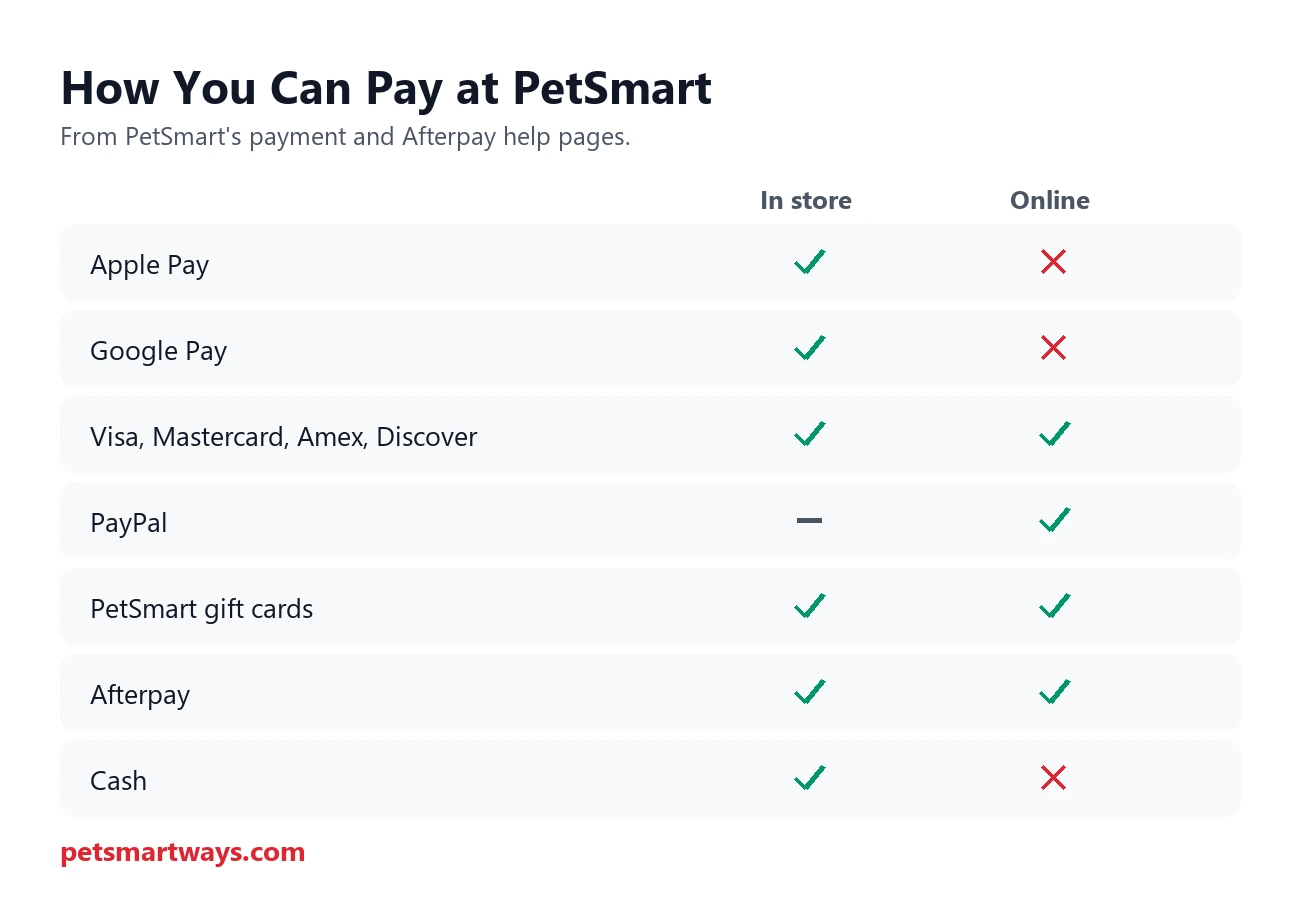
Stores also accept cash and checks, based on PetSmart’s return policy, which explains refunds for both. Online orders can’t be paid by cash on delivery or layaway.
Gift cards work in both places, and you can use up to five on one online order. Merchandise return cards only work in stores.
Afterpay With Apple Pay
Afterpay splits a purchase into four interest-free payments, with 25% due at checkout and the rest every two weeks. In stores, you add the Afterpay Card to Apple Pay or Google Pay and tap to pay.

The minimum order is $1, up to your Afterpay limit, and gift cards aren’t eligible. Late fees may apply if you miss a payment.
To return an Afterpay purchase in store, use the Afterpay digital card in your wallet so the refund goes back to Afterpay. Otherwise you’ll get a merchandise return card and still owe the remaining payments.
Paying for Services
Grooming, PetsHotel, Doggie Day Camp and training are paid in store, so Apple Pay works there too. Services booked online are still settled at the store.
Our guides to grooming prices and boarding prices cover what those services cost.
Pickup and Delivery Orders
Curbside and in-store pickup orders are paid online when you order, so Apple Pay isn’t used for those. If you add something at the store, you can tap to pay for the extra item.
Orders through DoorDash, Instacart and similar apps are paid through that app. Whether Apple Pay works depends on the app, not PetSmart.
Our delivery guide explains pickup windows and delivery fees.
Combining Coupons, Points and Apple Pay
Apple Pay is just the final payment step, so coupons and Treats points work as normal. Apply them before you tap to pay.
Points you redeem lower the total first, then Apple Pay charges the remaining balance. You still earn points on the amount you pay.
When Apple Pay Won’t Work
- Your phone is locked or Face ID fails, so unlock it and try again
- The reader didn’t detect the phone, so pull back and tap again
- Your bank card isn’t supported in Wallet
- Your phone battery is dead, so carry a backup card
If the reader is having problems, the cashier can help you pay another way. Card daily limits still apply to Apple Pay purchases.
Paying for Autoship
Autoship orders are charged automatically online, so they need a saved payment method rather than Apple Pay. Gift cards can’t be used for Autoship either.
A saved credit card is the simplest option. You’ll still get the Autoship discounts and earn Treats points on every delivery.
Is Apple Pay Safe at PetSmart?
Apple Pay uses a device-specific number instead of your real card number, so the store never sees your card details. Each payment is approved with Face ID, Touch ID or your passcode.
That makes it a little safer than handing over a physical card. There’s no extra fee to use it.
Returns on Apple Pay Purchases
Refunds go back to the card linked to Apple Pay, following PetSmart’s normal return rules. You may need to tap your phone again so the store can match the card.
Bring your receipt or have your Treats account handy to find the purchase. Our return policy guide explains refunds by payment type.
Faster Checkout Tips
- Activate app offers in the PetSmart app before you go
- Have your Treats barcode ready
- Use curbside or in-store pickup if you prefer to pay online
- Keep a backup card in case your phone is low on battery
Check our PetSmart coupons guide for current deals before checkout.
Apple Pay Questions
Does PetSmart take Apple Pay at every store?
PetSmart’s help pages describe tap-to-pay with Apple Pay in its stores. If a reader has trouble, ask the cashier for help.
Can I use Apple Pay in the PetSmart app?
PetSmart’s online payment options don’t include Apple Pay. Use a card, PayPal, gift card or Afterpay in the app.
Can I pay with Apple Pay for a grooming appointment?
Yes, salon services are paid in store, where tap to pay works.
Can I split a payment between Apple Pay and a gift card?
Ask the cashier to apply the gift card first. You can then pay the remaining balance with Apple Pay.
Does PetSmart charge extra for Apple Pay?
No, there’s no fee for paying with Apple Pay or any other card method in store.
Can I use Apple Pay at the vet inside PetSmart?
Banfield and other in-store vet clinics are separate businesses with their own registers. Ask the clinic which payment methods it accepts.
Does PetSmart accept Google Pay?
Yes, in stores. PetSmart’s Afterpay instructions name both Apple Pay and Google Pay for in-store tap to pay.